SQL> ALTER SESSION SET OPTIMIZER_CAPTURE_SQL_PLAN_BASELINES=TRUESQL> ALTER SESSION SET optimizer_mode='FIRST_ROWS'; Session altered. SQL> SELECT /* TEST */ 2 * 3 FROM SALES WHERE QUANTITY_SOLD > 40 4 ORDER BY PROD_ID; no rows selected SQL> ALTER SYSTEM FLUSH SHARED_POOL; System altered. SQL> ALTER SESSION SET optimizer_mode='ALL_ROWS'; Session altered. SQL> SELECT /* TEST */ 2 * 3 FROM SALES WHERE QUANTITY_SOLD > 40 4 ORDER BY PROD_ID; no rows selectedSecond execution of the query has encountered a change in the execution plan. But it has not been ‘accepted as yet even though it has been ‘enabled’.SQL> SELECT sql_handle, plan_name, enabled, accepted FROM dba_sql_plan_baselines WHERE sql_text like '%GAVIN%'; 2 Ena- SQL_HANDLE PLAN_NAME bled Acpt ------------------------------ ------------------------------ ---- ---- SYS_SQL_6f3dcd88c7488035 SYS_SQL_PLAN_c748803511df68d0 YES YES SYS_SQL_6f3dcd88c7488035 SYS_SQL_PLAN_c748803554bc8843 YES NOWe can use the EVOLVE_SQL_PLAN_BASELINE function to compare the performance between the two plans. We note that the second plan has not been automatically evolved or accepted because it does not pass the performance improvement criteria which has been laid downSQL> SET LONG 10000 SQL> SELECT DBMS_SPM.evolve_sql_plan_baseline(sql_handle => 'SYS_SQL_6f3dcd88c7488035') FROM dual;DBMS_SPM.EVOLVE_SQL_PLAN_BASELINE(SQL_HANDLE=>'SYS_SQL_6F3DCD88C7488035') -------------------------------------------------------------------------------- ------------------------------------------------------------------------------- Evolve SQL Plan Baseline Report ------------------------------------------------------------------------------- Inputs: ------- SQL_HANDLE = SYS_SQL_6f3dcd88c7488035 PLAN_NAME = TIME_LIMIT = DBMS_SPM.AUTO_LIMIT VERIFY = YES COMMIT = YES Plan: SYS_SQL_PLAN_c748803554bc8843 ----------------------------------- Plan was verified: Time used 1.457 seconds. Failed performance criterion: Compound improvement ratio <= 1.16. Baseline Plan Test Plan Improv. Ratio ------------- --------- ------------- Execution Status: COMPLETE COMPLETE Rows Processed: 0 0 Elapsed Time(ms): 1036 304 3.41 CPU Time(ms): 1020 300 3.4 Buffer Gets: 1929 1727 1.12 Disk Reads: 0 0 Direct Writes: 0 0 Fetches: 0 0 Executions: 1 1 ------------------------------------------------------------------------------- Report Summary ------------------------------------------------------------------------------- Number of SQL plan baselines verified: 1. Number of SQL plan baselines evolved: 0.We can also manually evolve the plan if we ourselves feel that we know that the plan is a better oneSQL> var spm number; SQL> exec :spm := dbms_spm.alter_sql_plan_baseline(sql_handle =>'SYS_SQL_6f3dcd88c7488035', - plan_name =>'SYS_SQL_PLAN_c748803554bc8843', attribute_name => 'ACCEPTED',attribute_value => 'YES'); PL/SQL procedure successfully completed. SQL> SELECT sql_handle, plan_name, enabled, accepted FROM dba_sql_plan_baselines 2 WHERE sql_text like '%GAVIN%'; Ena- SQL_HANDLE PLAN_NAME bled Acpt ------------------------------ ------------------------------ ---- ---- SYS_SQL_6f3dcd88c7488035 SYS_SQL_PLAN_c748803511df68d0 YES YES SYS_SQL_6f3dcd88c7488035 SYS_SQL_PLAN_c748803554bc8843 YES YES
Showing posts with label sql plan management. Show all posts
Showing posts with label sql plan management. Show all posts
sql plan baseline example


Theory on SQLPLAN BASELINES Using Stored Outlines
SQLPLAN BASELINES Using Stored Outlines
If you don’t have access to SQL Tuning Sets you can capture your existing execution plan usingStored Outlines. There are two ways to capture Stored Outlines, you can either manually create
one for each SQL statement using the CREATE OUTLINE command or let Oracle
automatically create a Stored Outline for each SQL statement that is executed. Below are the
steps needed to let Oracle automatically create the Stored Outlines for you.
1. Start a new session and issue the following command to switch on the automatic
capture of a Stored Outline for each SQL statement that gets parsed from now on until
you explicitly turn it off.
SQL > alter system set CREATE_STORED_OUTLINES=OLDPLAN;
NOTE: Ensure that the user for which the Stored Outlines are to be created has the CREATE
ANY OUTLINE privilege. If they don’t the Stored Outlines will not be captured.
2. Now execute your workload either by running your application or manually issuing SQL
statements. NOTE: if you manually issue the SQL statements ensure you use the exact
SQL text used by the application, if it uses bind variables you will have to use them too.
3. Once you have executed your critical SQL statements you should turn off the automatic
capture by issuing the following command:
SQL > alter system set CREATE_STORED_OUTLINES=false;
4. To confirm you have captured the necessary Stored Outlines issue the following SQL
statement.
SQL> select name, sql_text, category from user_outlines;
NOTE: Each Stored Outline should be in the OLDPLAN category.
5. The actual Stored Outlines are stored in the OUTLN schema. Before you upgrade you
should export this schema as a backup.
exp outln/outln file=soutline.dmp owner=outln rows=y
6. After the upgrade to Oracle Database 11gR2, you can migrate stored outlines for
one or more SQL statements to SQL plan baselines using
DBMS_SPM.MIGRATE_STORED_OUTLINE or through Oracle Enterprise Manager (EM).
You can specify which stored outline(s) to be migrated based on outline name, SQL
text, or outline category, or migrate all stored outlines in the system to SQL plan
baselines.
SQL> variable report clob;
-- Migrate a single Stored Outline by name
SQL> exec :report:=DBMS_SPM.MIGRATE_STORED_OUTLINE( -
attribute_name=>'OUTLINE_NAME', attribute_value =>
'stmt01');
-- Migrate all Stored Outlines
SQL> exec :report:=DBMS_SPM.MIGRATE_STORED_OUTLINE( -
attribute_name=>'ALL');
Note: If you are not planning on doing an in-place upgrade you will have to move the STS, SQL
Trace files or Stored Outlines to the Oracle Database 11g system.
reference: A practical session on migrating outline blog post - practical session migrating stored outlines to sql plan baseline
load sql plan baseline from cursor cache and making sql plan baseline of query with hints
It is possible to load plans for statements directly from the cursor cache into the SQL Management Base. By applying a filter - on the module name, the schema, or the SQL_ID - you can identify the SQL statement or set of SQL statement you wish to capture.
The plans can be loaded using the PL/SQL procedure DBMS_SPM.LOAD_PLANS_FROM_CURSOR_CACHE or through Oracle Enterprise Manager. The
next time these statements are executed their SQL plan baselines will be used. Loading plans directly from the cursor cache can be extremely useful if application SQL has beentuned by hand using hints. Since it is unlikely the application SQL can be changed to include the hint, by capturing the tuned execution plan as a SQL plan baseline you can ensure that the application SQL will use that plan in the future. By using the simple steps below you can use SPM to capture the hinted execution plan and associate it with the non-hinted SQL statement.You begin by capturing a SQL plan baseline for the non-hinted SQL statement.
1. In a SQL*Plus session run the non-hinted SQL statement so we can begin the SQL plan
baseline capture
SQL> SELECT prod_name, SUM(amount_sold)
FROM Sales s, Products p
WHERE s.prod_id=p.prod_id
AND prod_category = :ctgy
GROUP BY prod_name;
2. Then find the SQL_ID for the statement in the V$SQL view.
SQL> SELECT sql_id, sql_fulltext
FROM V$SQL
WHERE sql_text LIKE '%SELECT prod_name, SUM(%';
SQL_ID SQL_FULLTEXT
------------- ---------------------------------------
74hnd835n81yv select SQL_ID, SQL_FULLTEXT from v$SQL
chj6q8z7ykbyy SELECT PROD_NAME, SUM(AMOUNT_SOLD)
3. Using the SQL_ID create a SQL plan baseline for the statement.
SQL> variable cnt number;
SQL> EXECUTE :cnt :=DBMS_SPM.LOAD_PLAN_FROM_CURSOR_CACHE(
sql_id=>'chj6q8z7ykbyy');
4. The plan that was captured is the sub-optimal plan and it will need to be disabled. The
SQL_HANDLE & PLAN_NAME are required to disable the plan. These can found by
looking in DBA_SQL_PLAN_BASELINE view.
SQL> SELECT sql_handle, sql_text, plan_name, enabled FROM
dba_sql_plan_baselines;
SQL_HANDLE SQL_TEXT PLAN_NAME ENABLE
------------------------ ---------------------- ----------------------- ------
SYS_SQL_bf5c9b08f72bde3e SELECTPROD_NAME,SUM SQL_PLAN_byr4v13vkrrjy42949306 Y
5. Using DBMS_SPM.ALTER_SQL_PLAN_BASELINE disable the bad plan
SQL> variable cnt number;
SQL> exec :cnt :=DBMS_SPM.ALTER_SQL_PLAN_BASELINE(
SQL_HANDLE => 'SYS_SQL_bf5c9b08f72bde3e',
PLAN_NAME
=> 'SQL_PLAN_byr4v13vkrrjy42949306',
ATTRIBUTE_NAME => 'enabled',
ATTRIBUTE_VALUE => 'NO');
SQL> SELECT sql_handle, sql_text, plan_name, enabled
FROM dba_sql_plan_baselines;
SQL_HANDLE SQL_TEXT PLAN_NAME ENABLE
------------------------ ---------------------- ----------------------- ------
SYS_SQL_bf5c9b08f72bde3e SELECTPROD_NAME,SUM SQL_PLAN_byr4v13vkrrjy42949306 N
6. Now you need to modify the SQL statement using the necessary hints & execute the
modified statement.
SQL> SELECT /*+ INDEX(p) */ prod_name, SUM(amount_sold)
FROM Sales s, Products p
WHERE s.prod_id=p.prod_id
AND prod_category = :ctgy
GROUP BY prod_name;
7. Find the SQL_ID and PLAN_HASH_VALUE for the hinted SQL statement in the V$SQL
view.
SQL> SELECT sql_id, plan_hash_value, fulltext
FROM V$SQL
WHERE sql_text LIKE '%SELECT /*+ INDEX(p) */
prod_na%';
SQL_ID PLAN_HASH_VALUE SQL_FULLTEXT
------------- --------------- ---------------------------
9t5v8swp79svs 3262214722 select SQL_ID, SQL_FULLTEXT
djkqjd0kvgmb5 3074207202 SELECT /*+ INDEX(p) */
8. Using the SQL_ID and PLAN_HASH_VALUE for the modified plan, create a new
accepted plan for original SQL statement by associating the modified plan to the
original statement's SQL_HANDLE.
exec :cnt:=dbms_spm.load_plans_from_cursor_cache(
sql_id => 'djkqjd0kvgmb5',
plan_hash_value => 3074207202,
sql_handle => 'SYS_SQL_bf5c9b08f72bde3e‘);
The plans can be loaded using the PL/SQL procedure DBMS_SPM.LOAD_PLANS_FROM_CURSOR_CACHE or through Oracle Enterprise Manager. The
next time these statements are executed their SQL plan baselines will be used. Loading plans directly from the cursor cache can be extremely useful if application SQL has beentuned by hand using hints. Since it is unlikely the application SQL can be changed to include the hint, by capturing the tuned execution plan as a SQL plan baseline you can ensure that the application SQL will use that plan in the future. By using the simple steps below you can use SPM to capture the hinted execution plan and associate it with the non-hinted SQL statement.You begin by capturing a SQL plan baseline for the non-hinted SQL statement.
1. In a SQL*Plus session run the non-hinted SQL statement so we can begin the SQL plan
baseline capture
SQL> SELECT prod_name, SUM(amount_sold)
FROM Sales s, Products p
WHERE s.prod_id=p.prod_id
AND prod_category = :ctgy
GROUP BY prod_name;
2. Then find the SQL_ID for the statement in the V$SQL view.
SQL> SELECT sql_id, sql_fulltext
FROM V$SQL
WHERE sql_text LIKE '%SELECT prod_name, SUM(%';
SQL_ID SQL_FULLTEXT
------------- ---------------------------------------
74hnd835n81yv select SQL_ID, SQL_FULLTEXT from v$SQL
chj6q8z7ykbyy SELECT PROD_NAME, SUM(AMOUNT_SOLD)
3. Using the SQL_ID create a SQL plan baseline for the statement.
SQL> variable cnt number;
SQL> EXECUTE :cnt :=DBMS_SPM.LOAD_PLAN_FROM_CURSOR_CACHE(
sql_id=>'chj6q8z7ykbyy');
4. The plan that was captured is the sub-optimal plan and it will need to be disabled. The
SQL_HANDLE & PLAN_NAME are required to disable the plan. These can found by
looking in DBA_SQL_PLAN_BASELINE view.
SQL> SELECT sql_handle, sql_text, plan_name, enabled FROM
dba_sql_plan_baselines;
SQL_HANDLE SQL_TEXT PLAN_NAME ENABLE
------------------------ ---------------------- ----------------------- ------
SYS_SQL_bf5c9b08f72bde3e SELECTPROD_NAME,SUM SQL_PLAN_byr4v13vkrrjy42949306 Y
5. Using DBMS_SPM.ALTER_SQL_PLAN_BASELINE disable the bad plan
SQL> variable cnt number;
SQL> exec :cnt :=DBMS_SPM.ALTER_SQL_PLAN_BASELINE(
SQL_HANDLE => 'SYS_SQL_bf5c9b08f72bde3e',
PLAN_NAME
=> 'SQL_PLAN_byr4v13vkrrjy42949306',
ATTRIBUTE_NAME => 'enabled',
ATTRIBUTE_VALUE => 'NO');
SQL> SELECT sql_handle, sql_text, plan_name, enabled
FROM dba_sql_plan_baselines;
SQL_HANDLE SQL_TEXT PLAN_NAME ENABLE
------------------------ ---------------------- ----------------------- ------
SYS_SQL_bf5c9b08f72bde3e SELECTPROD_NAME,SUM SQL_PLAN_byr4v13vkrrjy42949306 N
6. Now you need to modify the SQL statement using the necessary hints & execute the
modified statement.
SQL> SELECT /*+ INDEX(p) */ prod_name, SUM(amount_sold)
FROM Sales s, Products p
WHERE s.prod_id=p.prod_id
AND prod_category = :ctgy
GROUP BY prod_name;
7. Find the SQL_ID and PLAN_HASH_VALUE for the hinted SQL statement in the V$SQL
view.
SQL> SELECT sql_id, plan_hash_value, fulltext
FROM V$SQL
WHERE sql_text LIKE '%SELECT /*+ INDEX(p) */
prod_na%';
SQL_ID PLAN_HASH_VALUE SQL_FULLTEXT
------------- --------------- ---------------------------
9t5v8swp79svs 3262214722 select SQL_ID, SQL_FULLTEXT
djkqjd0kvgmb5 3074207202 SELECT /*+ INDEX(p) */
8. Using the SQL_ID and PLAN_HASH_VALUE for the modified plan, create a new
accepted plan for original SQL statement by associating the modified plan to the
original statement's SQL_HANDLE.
exec :cnt:=dbms_spm.load_plans_from_cursor_cache(
sql_id => 'djkqjd0kvgmb5',
plan_hash_value => 3074207202,
sql_handle => 'SYS_SQL_bf5c9b08f72bde3e‘);
creating sql plan baseline and its management
What most DBAs want is plan stability that is execution plans should only change when they will result in
performance gains. SQL plan management (SPM) ensures that runtime performance will never degrade due to the change of an execution plan. To guarantee this, only accepted (trusted) execution plans will be
used; any plan evolution will be tracked and evaluated at a later point in time and only be
accepted as verified if the new plan causes no runtime change or an improvement of the runtime.
The SQL Plan Management has three main components:
1. SQL plan baseline capture:
Create SQL plan baselines that represents accepted (trusted) execution plans
for all relevant SQL statements. The SQL plan baselines are stored in a plan
history in the SQL Management Base in the SYSAUX tablespace.
2. SQL plan baseline selection:
Ensure that only accepted execution plans are used for statements with a SQL
plan baseline and track all new execution plans in the plan history for a
statement. The plan history consists of accepted and unaccepted plans. An
unaccepted plan can be unverified (newly found but not verified) or rejected
(verified but not found to performant).
3. SQL plan baseline evolution:
Evaluate all unverified execution plans for a given statement in the plan history
to become either accepted or rejected.
The SQL PLAN history enables the SPM aware optimizer to determine whether the best-cost plan it has produced is a brand new plan or not. A new plan represents a plan change that has potential to cause performance regression. For this reason, the SPM aware optimizer does not choose a brand new best-cost plan. Instead, it chooses from a set of accepted plans. An accepted plan is one that has been either verified to not cause performance regression or designated to have good performance. A set of accepted plans is called a SQL plan baseline, which represents a subset of the plan history.
A brand new plan is added to the plan history as a non-accepted plan. Later, an SPM utility verifies its performance, and keeps it as a non-accepted plan if it will cause a performance regression, or changes it to an accepted plan if it will provide a performance improvement. The plan performance verification process ensures both plan stability and plan adaptability. The figure below shows the SMB containing the plan history for three SQL statements. Each plan history contains some accepted plans (the SQL plan baseline) and some non-accepted plans
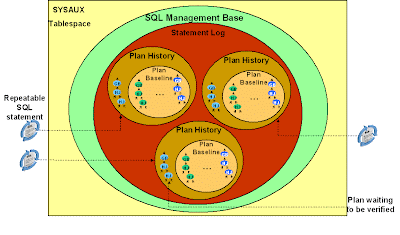
You can create a SQL plan baseline in several ways: using a SQL Tuning Set (STS); from the cursor cache; exporting from one database and importing into another; and automatically for every statement. Let's look at each in turn.
SQL> variable pls number;
SQL> exec :pls := dbms_spm.load_plans_from_sqlset(sqlset_name => 'MY_STS', -
> basic_filter => 'sql_text like ''select%p.prod_name%''');
This will create SQL plan baselines for all statements that match the specified filter.
SQL> exec :pls := dbms_spm.load_plans_from_cursor_cache( -
> attribute_name => 'SQL_TEXT', -
> attribute_value => 'select%p.prod_name%');
This will create SQL plan baselines for all statements whose text matches the specified string. Several overloaded variations of this function allow you to filter on other cursor attributes.
SQL> exec dbms_spm.create_stgtab_baseline(table_name => 'MY_STGTAB', -
> table_owner => 'SH');
PL/SQL procedure successfully completed.
SQL> exec :pls := dbms_spm.pack_stgtab_baseline( -
> table_name => 'MY_STGTAB', -
> table_owner => 'SH', -
> sql_text => 'select%p.prod_name%');
This will pack all SQL plan baselines for statements that match the specified filter. The staging table, MY_STGTAB, is a regular table that you should export to the production system using Datapump Export.
On the production system, you can now unpack the staging table to create the SQL plan baselines:
SQL> exec :pls := dbms_spm.unpack_stgtab_baseline( -
> table_name => 'MY_STGTAB', -
> table_owner => 'SH', -
> sql_text => 'select%p.prod_name%');
This will unpack the staging table and create SQL plan baselines. Note that the filter for unpacking the staging table is optional and may be different than the one used during packing. This means that you can pack several SQL plan baselines into a staging table and selectively unpack only a subset of them on the target system.
You can use the automatic plan capture mode when you have upgraded from a previous database version. Set optimizer_features_enable to the earlier version and execute your workload. Every repeatable statement will have its plan captured thus creating SQL plan baselines. You can reset optimizer_features_enable to its default value after you are sure that all statements in your workload have had a chance to execute.
Note that this automatic plan capture occurs only for repeatable statements, that is, statements that are executed at least twice. Statements that are only executed once will not benefit from SQL plan baselines since accepted plans are only used in subsequent hard parses.
The following example shows a plan being captured automatically when the same statement is executed twice:
SQL> alter session set optimizer_capture_sql_plan_baselines = true;
Session altered.
SQL> var pid number
SQL> exec :pid := 100;
PL/SQL procedure successfully completed.
SQL> select p.prod_name, s.amount_sold, t.calendar_year
2 from sales s, products p, times t
3 where s.prod_id = p.prod_id
4 and s.time_id = t.time_id
5 and p.prod_id < :pid;
PROD_NAME AMOUNT_SOLD CALENDAR_YEAR
--------- ----------- -------------
...
9 rows selected.
SQL> /
PROD_NAME AMOUNT_SOLD CALENDAR_YEAR
--------- ----------- -------------
...
9 rows selected.
SQL> alter session set optimizer_capture_sql_plan_baselines = false;
Session altered
Automatic plan capture will not occur for a statement if a stored outline exists for it and is enabled and the parameter use_stored_outlines is TRUE. In this case, turn on incremental capture of plans into an STS using the function capture_cursor_cache_sqlset() in the DBMS_SQLTUNE package. After you have collected the plans for your workload into the STS, manually create SQL plan baselines using the method described earlier. Then, disable the stored outlines or set use_stored_outlines to FALSE. From now on, SPM will manage your workload and stored outlines will not be used for those statements. In this article, we have seen how to create SQL plan baselines. In the next, we will describe the SPM aware optimizer and how it uses SQL plan baselines.
method to build a best-cost plan. If the initialization parameter
OPTIMIZER_USE_SQL_PLAN_BASELINES is set to TRUE (default value) then before the cost
based plan is executed the optimizer will try to find a matching plan in the SQL statement’s SQL
plan baseline; this is done as in-memory operation, thus introducing no measurable overhead to
any application. If a match is found then it proceeds with this plan. Otherwise, if no match is
found, the newly generated plan will be added to the plan history; it will have to be verified
before it can be accepted as a SQL plan baseline. Instead of executing the newly generated plan
the optimizer will cost each of the accepted plans for the SQL statement and pick the one with
the lowest cost (note that a SQL plan baseline can have more than one verified/accepted plan for
a given statement). However, if a change in the system (such as a dropped index) causes all of the
accepted plans to become non-reproducible, the optimizer will use the newly generated costbased
plan.
It is also possible to influence the optimizer’s choice of plan when it is selecting a plan from a
SQL plan baseline. SQL plan baselines can be marked as fixed. Fixed SQL plan baselines indicate
to the optimizer that they are preferred. If the optimizer is costing SQL plan baselines and one of
the plans is fixed, the optimizer will only cost the fixed plan and go with that if it is reproducible.
If the fixed plan(s) are not reproducible the optimizer will go back and cost the remaining SQL
plan baselines and select the one with the lowest cost. Note that costing a plan is nowhere near
as expensive as a hard parse. The optimizer is not looking at all possible access methods but at
one specific access path.
as a non-accepted plan that needs to be verified before it can become an accepted plan. It is
possible to evolve a SQL statement’s execution plan using Oracle Enterprise Manager or by
running the command-line function DBMS_SPM.EVOLVE_SQL_PLAN_BASELINE. Using either of
these methods you have three choices:
1. Accept the plan only if it performs better than the existing SQL plan baseline
2. Accept the plan without doing performance verification
3. Run the performance comparison and generate a report without evolving the new plan.
If you choose option 1, it will trigger the new plan to be evaluated to see if it performs better
than a selected plan baseline. If it does, then the new plan will be added to the SQL plan baseline,
as an accepted plan. If not the new plan will remain in the plan history as a non-accepted plan
but its LAST_VERIFIED attribute will be updated with the current timestamp. A formatted text
report is returned by the function, which contains the actions performed by the function as well
as side-by-side display of performance statistics of the new plan and the original plan.
If you choose option 2, the new plan will be added to the SQL plan baseline as an accepted plan
without verifying its performance. The report will also be generated.
If you choose option 3 the new plan will be evaluated to see if it performs better than a selected
plan baseline but it will not be accepted automatically if it does. After the evaluation only the
report will be generated.
currently created for specific SQL statements. Here is an example.
select sql_handle, sql_text, plan_name, origin,
enabled, accepted, fixed, autopurge
from dba_sql_plan_baselines
The above select statement returns the following rows
SQL_HANDLE SQL_TEXT PLAN_NAME ORIGIN ENA ACC FIX AUT
-------- ---------- ------------- ------- --- --- --- ---
SYS_SQL_6fe2 select... SYS_SQL_PLAN_1ea AUTO-CAP YES NO NO YES
SYS_SQL_6fe2 select... SYS_SQL_PLAN_4be AUTO-CAP YES YES NO YES
…
In this example the same SQL statement has two plans, both of which were automatically captured. One of the plans (SYS_SQL_PLAN_4be) is a plan baseline as it is both enabled and accepted. The other plan (SYS_SQL_PLAN_1ea) is a non-accepted plan, which has been queued for evolution or verification. It has been automatically captured and queued for verification; its accepted value is set to NO. Neither of the plans is fixed and they are both eligible for automatic purge.
To check the detailed execution plan for any SQL plan baseline you can use the procedure
DBMS_XPLAN.DISPLAY_SQL_PLAN_BASELINE.
It is also possible to check whether a SQL statement is using a SQL plan baseline by looking in V$SQL. If the SQL statement is using a SQL plan baseline the plan_name for the plan selected from that SQL plan baseline will be in the sql_plan_baseline column of V$SQL. You can join the V$SQL view to the DBA_SQL_PLAN_BASELINES view using the following query:
Select s.sql_text, b.plan_name, b.origin, b.accepted
From dba_sql_plan_baselines b, v$sql s
Where s.exact_matching_signature = b.signature
And s.SQL_PLAN_BASELINE = b.plan_name;
automatically run during the maintenance window. This automatic SQL tuning task targets highload
SQL statements. These statements are identified by the execution performance data
collected in the Automatic Workload Repository (AWR) snapshots. If the SQL Tuning Advisor
finds a better execution plan for a SQL statement it will recommend a SQL profile. Some of
these high-load SQL statements may already have SQL plan baselines created for them. If a SQL
profile recommendation made by the automatic SQL tuning task is implemented, the execution
plan found by the SQL Tuning Task will be added as an accepted SQL plan baseline.
The SQL Tuning Advisor can also be invoked manually, by creating a SQL Tuning Set for a
given SQL statement. If the SQL Tuning Advisor recommends a SQL profile for the statement
and it is manually implemented then that profile will be added as an accepted plan to the SQL
statements plan baseline if one exists.
Using SQL Plan Management for upgrade:
Undertaking a database upgrade is a daunting task for any DBA. Once the database has been
successfully upgraded you must still run the gauntlet of possible database behavior changes. On
the top of every DBA’s list of potential behavior changes are execution plan changes. With the
introduction of SQL Plan Management you now have an additional safety net to ensure
execution plans don’t change during the upgrade. In order to take full advantage of this safety net
you need to capture your existing execution plans before you upgrade so they can be used to seed
SPM.
Using SQL Tuning Sets:
If you have access to SQL Tuning Sets (STS) in the diagnostics pack then this is the easiest way
to capture your existing 10g execution plans. An STS is a database object that includes one or
more SQL statements along with their execution statistics, execution context and their current
execution plan. (An STS in Oracle Database 10gR1 will not capture the execution plans for the
SQL statements so it can’t be used to seed SPM. Only a 10gR2 STS will capture the plans).
To begin you will need to create a new STS. You can either do this through Oracle Enterprise
Manager (EM) or using the DBMS_SQLTUNE package. In this example we will use
DBMS_SQLTUNE.
BEGIN
SYS.DBMS_SQLTUNE.CREATE_SQLSET (
sqlset_name => 'SPM_STS',
description => '10g plans');
END;
\
Once the STS has been created we need to populate it. You can populate an STS from the
workload repository, another STS or from the cursor cache. In this case we will capture the SQL
statements and their execution plans from the cursor cache. This is a two-step process. In the
first step we create a ref cursor to select the specified SQL from the cursor cache (in this case all
non sys SQL statements). Then in the second step we use that ref cursor to populate the STS.
DECLARE
stscur dbms_sqltune.sqlset_cursor;
BEGIN
OPEN stscur FOR
SELECT VALUE(P)
FROM TABLE(dbms_sqltune.select_cursor_cache(
‘parsing_schema_name <> ‘‘SYS’’’,
null, null, null, null, 1, null, 'ALL')) P;
-- populate the sqlset
dbms_sqltune.load_sqlset(sqlset_name => 'SPM_STS',
populate_cursor => stscur);
END;
/
Once the software upgrade is completed the execution plans can be bulk loaded from an STS
into SPM using the PL/SQL procedure DBMS_SPM.LOAD_PLANS_FROM_SQLSET or
through Oracle Enterprise Manager (EM).
SQL> Variable cnt number
SQL> execute :cnt := DBMS_SPM.LOAD_PLANS_FROM_SQLSET( -
sqlset_name => 'SPM_STS');
Few bugs I noticed:
1. Packed sql tuning set in 10.2.0.5 and unpacked in 11.2.0.1. 11g DB was hanged when plan was enabled in 11g.
2. Sql plan baselines were packed and unpacked. When unpacked the one sqlplan baseline which had higher cost for same sql handle was not accepted in DB where it was unpacked. Later on that plan had to be evolved in order to be enabled.
Note: Optimizer_cost from view dba_sql_plan_baselines and actual cost as shown from dbms_xplan.display_sql_plan_baselines were different. It has reason to be so.
Reference: White paper SQL Plan Management in Oracle Database 11g
oracle blog
used; any plan evolution will be tracked and evaluated at a later point in time and only be
accepted as verified if the new plan causes no runtime change or an improvement of the runtime.
The SQL Plan Management has three main components:
1. SQL plan baseline capture:
Create SQL plan baselines that represents accepted (trusted) execution plans
for all relevant SQL statements. The SQL plan baselines are stored in a plan
history in the SQL Management Base in the SYSAUX tablespace.
2. SQL plan baseline selection:
Ensure that only accepted execution plans are used for statements with a SQL
plan baseline and track all new execution plans in the plan history for a
statement. The plan history consists of accepted and unaccepted plans. An
unaccepted plan can be unverified (newly found but not verified) or rejected
(verified but not found to performant).
3. SQL plan baseline evolution:
Evaluate all unverified execution plans for a given statement in the plan history
to become either accepted or rejected.
The SQL PLAN history enables the SPM aware optimizer to determine whether the best-cost plan it has produced is a brand new plan or not. A new plan represents a plan change that has potential to cause performance regression. For this reason, the SPM aware optimizer does not choose a brand new best-cost plan. Instead, it chooses from a set of accepted plans. An accepted plan is one that has been either verified to not cause performance regression or designated to have good performance. A set of accepted plans is called a SQL plan baseline, which represents a subset of the plan history.
A brand new plan is added to the plan history as a non-accepted plan. Later, an SPM utility verifies its performance, and keeps it as a non-accepted plan if it will cause a performance regression, or changes it to an accepted plan if it will provide a performance improvement. The plan performance verification process ensures both plan stability and plan adaptability. The figure below shows the SMB containing the plan history for three SQL statements. Each plan history contains some accepted plans (the SQL plan baseline) and some non-accepted plans
1.SQL plan baseline capture:
You can create a SQL plan baseline in several ways: using a SQL Tuning Set (STS); from the cursor cache; exporting from one database and importing into another; and automatically for every statement. Let's look at each in turn.
Creating SQL plan baselines from STS
If you are upgrading from 10gR2 or have an 11g test system, you might already have an STS containing some or all of your SQL statements. This STS might contain plans that perform satisfactorily. Let's call this STS MY_STS. You can create a SQL plan baseline from this STS as follows:SQL> variable pls number;
SQL> exec :pls := dbms_spm.load_plans_from_sqlset(sqlset_name => 'MY_STS', -
> basic_filter => 'sql_text like ''select%p.prod_name%''');
This will create SQL plan baselines for all statements that match the specified filter.
Creating SQL plan baselines from cursor cache
You can automatically create SQL plan baselines for any cursor that is currently in the cache as follows:SQL> exec :pls := dbms_spm.load_plans_from_cursor_cache( -
> attribute_name => 'SQL_TEXT', -
> attribute_value => 'select%p.prod_name%');
This will create SQL plan baselines for all statements whose text matches the specified string. Several overloaded variations of this function allow you to filter on other cursor attributes.
Creating SQL plan baselines using a staging table
If you already have SQL plan baselines (say on an 11g test system), you can export them to another system (a production system for instance). First, on the test system, create a staging table and pack the SQL plan baselines you want to export:SQL> exec dbms_spm.create_stgtab_baseline(table_name => 'MY_STGTAB', -
> table_owner => 'SH');
PL/SQL procedure successfully completed.
SQL> exec :pls := dbms_spm.pack_stgtab_baseline( -
> table_name => 'MY_STGTAB', -
> table_owner => 'SH', -
> sql_text => 'select%p.prod_name%');
This will pack all SQL plan baselines for statements that match the specified filter. The staging table, MY_STGTAB, is a regular table that you should export to the production system using Datapump Export.
On the production system, you can now unpack the staging table to create the SQL plan baselines:
SQL> exec :pls := dbms_spm.unpack_stgtab_baseline( -
> table_name => 'MY_STGTAB', -
> table_owner => 'SH', -
> sql_text => 'select%p.prod_name%');
This will unpack the staging table and create SQL plan baselines. Note that the filter for unpacking the staging table is optional and may be different than the one used during packing. This means that you can pack several SQL plan baselines into a staging table and selectively unpack only a subset of them on the target system.
Creating SQL plan from migrating stored outlines:
var mig clob
exec :mig:=dbms_spm.migrate_stored_outline(attribute_name=>-
> 'outline_name',attribute_value=>'OL1',fixed=>'NO')
> 'outline_name',attribute_value=>'OL1',fixed=>'NO')
see post here oracle stored outline and sql plan baseline
Creating SQL plan baselines automatically
You can create SQL plan
baselines for all repeatable statements automatically by setting the parameter
optimizer_capture_sql_plan_baselines
to TRUE (default is FALSE). The first plan captured for any statement is
automatically accepted and becomes part of the SQL plan baseline, so enable this
parameter only when you are sure that the default plans are performing well.
You can use the automatic plan capture mode when you have upgraded from a previous database version. Set optimizer_features_enable to the earlier version and execute your workload. Every repeatable statement will have its plan captured thus creating SQL plan baselines. You can reset optimizer_features_enable to its default value after you are sure that all statements in your workload have had a chance to execute.
Note that this automatic plan capture occurs only for repeatable statements, that is, statements that are executed at least twice. Statements that are only executed once will not benefit from SQL plan baselines since accepted plans are only used in subsequent hard parses.
The following example shows a plan being captured automatically when the same statement is executed twice:
SQL> alter session set optimizer_capture_sql_plan_baselines = true;
Session altered.
SQL> var pid number
SQL> exec :pid := 100;
PL/SQL procedure successfully completed.
SQL> select p.prod_name, s.amount_sold, t.calendar_year
2 from sales s, products p, times t
3 where s.prod_id = p.prod_id
4 and s.time_id = t.time_id
5 and p.prod_id < :pid;
PROD_NAME AMOUNT_SOLD CALENDAR_YEAR
--------- ----------- -------------
...
9 rows selected.
SQL> /
PROD_NAME AMOUNT_SOLD CALENDAR_YEAR
--------- ----------- -------------
...
9 rows selected.
SQL> alter session set optimizer_capture_sql_plan_baselines = false;
Session altered
Automatic plan capture will not occur for a statement if a stored outline exists for it and is enabled and the parameter use_stored_outlines is TRUE. In this case, turn on incremental capture of plans into an STS using the function capture_cursor_cache_sqlset() in the DBMS_SQLTUNE package. After you have collected the plans for your workload into the STS, manually create SQL plan baselines using the method described earlier. Then, disable the stored outlines or set use_stored_outlines to FALSE. From now on, SPM will manage your workload and stored outlines will not be used for those statements. In this article, we have seen how to create SQL plan baselines. In the next, we will describe the SPM aware optimizer and how it uses SQL plan baselines.
2. SQL plan baseline selection:
Each time a SQL statement is compiled, the optimizer first uses the traditional cost-based searchmethod to build a best-cost plan. If the initialization parameter
OPTIMIZER_USE_SQL_PLAN_BASELINES is set to TRUE (default value) then before the cost
based plan is executed the optimizer will try to find a matching plan in the SQL statement’s SQL
plan baseline; this is done as in-memory operation, thus introducing no measurable overhead to
any application. If a match is found then it proceeds with this plan. Otherwise, if no match is
found, the newly generated plan will be added to the plan history; it will have to be verified
before it can be accepted as a SQL plan baseline. Instead of executing the newly generated plan
the optimizer will cost each of the accepted plans for the SQL statement and pick the one with
the lowest cost (note that a SQL plan baseline can have more than one verified/accepted plan for
a given statement). However, if a change in the system (such as a dropped index) causes all of the
accepted plans to become non-reproducible, the optimizer will use the newly generated costbased
plan.
It is also possible to influence the optimizer’s choice of plan when it is selecting a plan from a
SQL plan baseline. SQL plan baselines can be marked as fixed. Fixed SQL plan baselines indicate
to the optimizer that they are preferred. If the optimizer is costing SQL plan baselines and one of
the plans is fixed, the optimizer will only cost the fixed plan and go with that if it is reproducible.
If the fixed plan(s) are not reproducible the optimizer will go back and cost the remaining SQL
plan baselines and select the one with the lowest cost. Note that costing a plan is nowhere near
as expensive as a hard parse. The optimizer is not looking at all possible access methods but at
one specific access path.
3.SQL Plan Baseline Evolution
When the optimizer finds a new plan for a SQL statement, the plan is added to the plan historyas a non-accepted plan that needs to be verified before it can become an accepted plan. It is
possible to evolve a SQL statement’s execution plan using Oracle Enterprise Manager or by
running the command-line function DBMS_SPM.EVOLVE_SQL_PLAN_BASELINE. Using either of
these methods you have three choices:
1. Accept the plan only if it performs better than the existing SQL plan baseline
2. Accept the plan without doing performance verification
3. Run the performance comparison and generate a report without evolving the new plan.
If you choose option 1, it will trigger the new plan to be evaluated to see if it performs better
than a selected plan baseline. If it does, then the new plan will be added to the SQL plan baseline,
as an accepted plan. If not the new plan will remain in the plan history as a non-accepted plan
but its LAST_VERIFIED attribute will be updated with the current timestamp. A formatted text
report is returned by the function, which contains the actions performed by the function as well
as side-by-side display of performance statistics of the new plan and the original plan.
If you choose option 2, the new plan will be added to the SQL plan baseline as an accepted plan
without verifying its performance. The report will also be generated.
If you choose option 3 the new plan will be evaluated to see if it performs better than a selected
plan baseline but it will not be accepted automatically if it does. After the evaluation only the
report will be generated.
Monitoring SPM through DBA views
The view DBA_SQL_PLAN_BASELINES displays information about the SQL plan baselinescurrently created for specific SQL statements. Here is an example.
select sql_handle, sql_text, plan_name, origin,
enabled, accepted, fixed, autopurge
from dba_sql_plan_baselines
The above select statement returns the following rows
SQL_HANDLE SQL_TEXT PLAN_NAME ORIGIN ENA ACC FIX AUT
-------- ---------- ------------- ------- --- --- --- ---
SYS_SQL_6fe2 select... SYS_SQL_PLAN_1ea AUTO-CAP YES NO NO YES
SYS_SQL_6fe2 select... SYS_SQL_PLAN_4be AUTO-CAP YES YES NO YES
…
In this example the same SQL statement has two plans, both of which were automatically captured. One of the plans (SYS_SQL_PLAN_4be) is a plan baseline as it is both enabled and accepted. The other plan (SYS_SQL_PLAN_1ea) is a non-accepted plan, which has been queued for evolution or verification. It has been automatically captured and queued for verification; its accepted value is set to NO. Neither of the plans is fixed and they are both eligible for automatic purge.
To check the detailed execution plan for any SQL plan baseline you can use the procedure
DBMS_XPLAN.DISPLAY_SQL_PLAN_BASELINE.
It is also possible to check whether a SQL statement is using a SQL plan baseline by looking in V$SQL. If the SQL statement is using a SQL plan baseline the plan_name for the plan selected from that SQL plan baseline will be in the sql_plan_baseline column of V$SQL. You can join the V$SQL view to the DBA_SQL_PLAN_BASELINES view using the following query:
Select s.sql_text, b.plan_name, b.origin, b.accepted
From dba_sql_plan_baselines b, v$sql s
Where s.exact_matching_signature = b.signature
And s.SQL_PLAN_BASELINE = b.plan_name;
Integration with Automatic SQL tuning
In Oracle Database 11g, the SQL Tuning Advisor, a part of the Tuning and Diagnostics pack, isautomatically run during the maintenance window. This automatic SQL tuning task targets highload
SQL statements. These statements are identified by the execution performance data
collected in the Automatic Workload Repository (AWR) snapshots. If the SQL Tuning Advisor
finds a better execution plan for a SQL statement it will recommend a SQL profile. Some of
these high-load SQL statements may already have SQL plan baselines created for them. If a SQL
profile recommendation made by the automatic SQL tuning task is implemented, the execution
plan found by the SQL Tuning Task will be added as an accepted SQL plan baseline.
The SQL Tuning Advisor can also be invoked manually, by creating a SQL Tuning Set for a
given SQL statement. If the SQL Tuning Advisor recommends a SQL profile for the statement
and it is manually implemented then that profile will be added as an accepted plan to the SQL
statements plan baseline if one exists.
Using SQL Plan Management for upgrade:
Undertaking a database upgrade is a daunting task for any DBA. Once the database has been
successfully upgraded you must still run the gauntlet of possible database behavior changes. On
the top of every DBA’s list of potential behavior changes are execution plan changes. With the
introduction of SQL Plan Management you now have an additional safety net to ensure
execution plans don’t change during the upgrade. In order to take full advantage of this safety net
you need to capture your existing execution plans before you upgrade so they can be used to seed
SPM.
Using SQL Tuning Sets:
If you have access to SQL Tuning Sets (STS) in the diagnostics pack then this is the easiest way
to capture your existing 10g execution plans. An STS is a database object that includes one or
more SQL statements along with their execution statistics, execution context and their current
execution plan. (An STS in Oracle Database 10gR1 will not capture the execution plans for the
SQL statements so it can’t be used to seed SPM. Only a 10gR2 STS will capture the plans).
To begin you will need to create a new STS. You can either do this through Oracle Enterprise
Manager (EM) or using the DBMS_SQLTUNE package. In this example we will use
DBMS_SQLTUNE.
BEGIN
SYS.DBMS_SQLTUNE.CREATE_SQLSET (
sqlset_name => 'SPM_STS',
description => '10g plans');
END;
\
Once the STS has been created we need to populate it. You can populate an STS from the
workload repository, another STS or from the cursor cache. In this case we will capture the SQL
statements and their execution plans from the cursor cache. This is a two-step process. In the
first step we create a ref cursor to select the specified SQL from the cursor cache (in this case all
non sys SQL statements). Then in the second step we use that ref cursor to populate the STS.
DECLARE
stscur dbms_sqltune.sqlset_cursor;
BEGIN
OPEN stscur FOR
SELECT VALUE(P)
FROM TABLE(dbms_sqltune.select_cursor_cache(
‘parsing_schema_name <> ‘‘SYS’’’,
null, null, null, null, 1, null, 'ALL')) P;
-- populate the sqlset
dbms_sqltune.load_sqlset(sqlset_name => 'SPM_STS',
populate_cursor => stscur);
END;
/
Once the software upgrade is completed the execution plans can be bulk loaded from an STS
into SPM using the PL/SQL procedure DBMS_SPM.LOAD_PLANS_FROM_SQLSET or
through Oracle Enterprise Manager (EM).
SQL> Variable cnt number
SQL> execute :cnt := DBMS_SPM.LOAD_PLANS_FROM_SQLSET( -
sqlset_name => 'SPM_STS');
Few bugs I noticed:
1. Packed sql tuning set in 10.2.0.5 and unpacked in 11.2.0.1. 11g DB was hanged when plan was enabled in 11g.
2. Sql plan baselines were packed and unpacked. When unpacked the one sqlplan baseline which had higher cost for same sql handle was not accepted in DB where it was unpacked. Later on that plan had to be evolved in order to be enabled.
Note: Optimizer_cost from view dba_sql_plan_baselines and actual cost as shown from dbms_xplan.display_sql_plan_baselines were different. It has reason to be so.
Reference: White paper SQL Plan Management in Oracle Database 11g
oracle blog
oracle stored outline and sql plan baseline, 11gR2,sql plan baseline overrides the stored outline
SQL PLAN BASELINE is wonderful feature of Oracle 11g. SQL plan baselines can be created in many ways; created from sql tuning sets,from the cursor cache, from migrating stored outline.This post shows- how to create stored outline, migrate outline to sql plan baseline, check use of sql plan baseline,check sql plan base line overrides stored outline
One additional point :Many people claims that before version oracle 11g sql profile is good option to gain plan stability but this is not true as sql profiles contains only statistical information like opt_estimate information to drive optimizer towards good plan but over time if statistical composition changes profile may no longer be helping query and execution plan may be sub optimal. In this case stored outlines are viable option from oracle 8i to gain plan stability before oracle 11g. From the evolution of sql plan baseline they are the best options. Further one great compatibility of sql plan baseline with stored outline is they can be created from stored outline using migrate_stored_outline procedure of package dbms_spm.
SQL> conn / as sysdba
Connected.
SQL> grant CREATE ANY OUTLINE to scott;
Grant succeeded.
SQL> conn scott/tiger
Connected.
SQL> create outline ol1 for category categ1 on select * from emp where deptno=10
Outline created.
SQL> select * from user_outlines;
NAME CATEGORY USED TIMESTAMP SIGNATURE COMPATIBLE ENABLED FORMAT
------------------------------ ------------------------------ ------ ----------- ----------------------------------------------------------------- --------------
MIGRATED
------------
OL1 CATEG1 UNUSED 19-JUL-13 mp where deptno=10 0B6183E104E1FA
NOT-MIGRATED
SQL> select name,category,sql_text from user_outlines;
NAME CATEGORY SQL_TEXT
------------------------------ ------------------------------ ------------------
OL1 CATEG1 select * from emp
SQL> var mig clob
SQL> exec :mig:=dbms_spm.migrate_stored_outline(attribute_name=>-
> 'outline_name',attribute_value=>'OL1',fixed=>'NO')
BEGIN :mig:=dbms_spm.migrate_stored_outline(attribute_name=> 'outline_name',attribute_value=>'OL 1',fixed=>'NO'); END;
*
ERROR at line 1:
ORA-38171: Insufficient privileges for SQL management object operation
ORA-06512: at "SYS.DBMS_SPM", line 3416
ORA-06512: at line 1
SQL> conn / as sysdba
Connected.
SQL> grant execute on dbms_spm to scott;
Grant succeeded.
SQL> conn scott/tiger
Connected.
SQL> exec :mig:=dbms_spm.migrate_stored_outline(attribute_name=>-
> 'outline_name',attribute_value=>'OL1',fixed=>'NO')
BEGIN :mig:=dbms_spm.migrate_stored_outline(attribute_name=> 'outline_name',attribute_value=>'OL 1',fixed=>'NO'); END;
*
ERROR at line 1:
ORA-38171: Insufficient privileges for SQL management object operation
ORA-06512: at "SYS.DBMS_SPM", line 3416
ORA-06512: at line 1
SQL> REM it shows granting execute privilege on dbms_spm is not enough
SQL> conn / as sysdba
Connected.
SQL> grant ADMINISTER SQL MANAGEMENT OBJECT to scott;
Grant succeeded.
SQL> conn scott/tiger
Connected.
SQL> exec :mig:=dbms_spm.migrate_stored_outline(attribute_name=>-
> 'outline_name',attribute_value=>'OL1',fixed=>'NO')
BEGIN :mig:=dbms_spm.migrate_stored_outline(attribute_name=> 'outline_name',attribute_value=>'OL 1',fixed=>'NO'); END;
*
ERROR at line 1:
ORA-18007: ALTER ANY OUTLINE privilege is required for this operation
ORA-06512: at "SYS.DBMS_SPM", line 3416
ORA-06512: at line 1
SQL> conn / as sysdba
Connected.
SQL> grant ALTER ANY OUTLINE to scott;
Grant succeeded.
SQL> conn scott/tiger
Connected.
SQL> exec :mig:=dbms_spm.migrate_stored_outline(attribute_name=>-
> 'outline_name',attribute_value=>'OL1',fixed=>'NO')
PL/SQL procedure successfully completed.
SQL> select name,sql_text,migrated from user_outlines;
NAME SQL_TEXT M IGRATED
------------------------------ ----------------------------------------------------------------- --------------- ------------
OL1 select * from emp where deptno=10 M IGRATED
SQL> conn / as sysdba
Connected.
SQL> select sql_handle,sql_text,plan_name,origin,enabled,accepted from dba_sql_plan_baselines;
SQL_HANDLE SQL_TEXT PLAN_NAME ORIGIN ENA ACC
------------------------------ -------------------------------------------------------------------------------- ------------------------------ -------------- --- ---
SYS_SQL_5b35ebd3a9ade57e select * from emp where deptno=10 OL1 STORED-OUTLINE YES YES
SQL> conn scott/tiger
Connected.
SQL> set autot on
SQL> select * from emp where deptno=10;
Execution Plan
----------------------------------------------------------
Plan hash value: 3956160932
--------------------------------------------------------------------------
Note
-----
- SQL plan baseline "OL1" used for this statement
SQL> Now we check sql plan base line overrides stored outline
SQL> alter session set use_stored_outlines=categ1;
Session altered.
SQL> select * from emp where deptno=10;
Execution Plan
----------------------------------------------------------
Plan hash value: 3956160932
--------------------------------------------------------------------------
Note
-----
- SQL plan baseline "OL1" used for this statement
Here we see inspite of enabling of use of stored outline of category categ1 execution plan is showing sql plan base line has been used. So we can say 11gR2 sql plan base overrides the stored outline
Stored Outline Quick Reference [ID 67536.1]
How to Use SQL Plan Management (SPM) - Example Usage [ID 456518.1]
One additional point :Many people claims that before version oracle 11g sql profile is good option to gain plan stability but this is not true as sql profiles contains only statistical information like opt_estimate information to drive optimizer towards good plan but over time if statistical composition changes profile may no longer be helping query and execution plan may be sub optimal. In this case stored outlines are viable option from oracle 8i to gain plan stability before oracle 11g. From the evolution of sql plan baseline they are the best options. Further one great compatibility of sql plan baseline with stored outline is they can be created from stored outline using migrate_stored_outline procedure of package dbms_spm.
SQL> conn / as sysdba
Connected.
SQL> grant CREATE ANY OUTLINE to scott;
Grant succeeded.
SQL> conn scott/tiger
Connected.
SQL> create outline ol1 for category categ1 on select * from emp where deptno=10
Outline created.
SQL> select * from user_outlines;
NAME CATEGORY USED TIMESTAMP SIGNATURE COMPATIBLE ENABLED FORMAT
------------------------------ ------------------------------ ------ ----------- ----------------------------------------------------------------- --------------
MIGRATED
------------
OL1 CATEG1 UNUSED 19-JUL-13 mp where deptno=10 0B6183E104E1FA
NOT-MIGRATED
SQL> select name,category,sql_text from user_outlines;
NAME CATEGORY SQL_TEXT
------------------------------ ------------------------------ ------------------
OL1 CATEG1 select * from emp
SQL> var mig clob
SQL> exec :mig:=dbms_spm.migrate_stored_outline(attribute_name=>-
> 'outline_name',attribute_value=>'OL1',fixed=>'NO')
BEGIN :mig:=dbms_spm.migrate_stored_outline(attribute_name=> 'outline_name',attribute_value=>'OL 1',fixed=>'NO'); END;
*
ERROR at line 1:
ORA-38171: Insufficient privileges for SQL management object operation
ORA-06512: at "SYS.DBMS_SPM", line 3416
ORA-06512: at line 1
SQL> conn / as sysdba
Connected.
SQL> grant execute on dbms_spm to scott;
Grant succeeded.
SQL> conn scott/tiger
Connected.
SQL> exec :mig:=dbms_spm.migrate_stored_outline(attribute_name=>-
> 'outline_name',attribute_value=>'OL1',fixed=>'NO')
BEGIN :mig:=dbms_spm.migrate_stored_outline(attribute_name=> 'outline_name',attribute_value=>'OL 1',fixed=>'NO'); END;
*
ERROR at line 1:
ORA-38171: Insufficient privileges for SQL management object operation
ORA-06512: at "SYS.DBMS_SPM", line 3416
ORA-06512: at line 1
SQL> REM it shows granting execute privilege on dbms_spm is not enough
SQL> conn / as sysdba
Connected.
SQL> grant ADMINISTER SQL MANAGEMENT OBJECT to scott;
Grant succeeded.
SQL> conn scott/tiger
Connected.
SQL> exec :mig:=dbms_spm.migrate_stored_outline(attribute_name=>-
> 'outline_name',attribute_value=>'OL1',fixed=>'NO')
BEGIN :mig:=dbms_spm.migrate_stored_outline(attribute_name=> 'outline_name',attribute_value=>'OL 1',fixed=>'NO'); END;
*
ERROR at line 1:
ORA-18007: ALTER ANY OUTLINE privilege is required for this operation
ORA-06512: at "SYS.DBMS_SPM", line 3416
ORA-06512: at line 1
SQL> conn / as sysdba
Connected.
SQL> grant ALTER ANY OUTLINE to scott;
Grant succeeded.
SQL> conn scott/tiger
Connected.
SQL> exec :mig:=dbms_spm.migrate_stored_outline(attribute_name=>-
> 'outline_name',attribute_value=>'OL1',fixed=>'NO')
PL/SQL procedure successfully completed.
SQL> select name,sql_text,migrated from user_outlines;
NAME SQL_TEXT M IGRATED
------------------------------ ----------------------------------------------------------------- --------------- ------------
OL1 select * from emp where deptno=10 M IGRATED
SQL> conn / as sysdba
Connected.
SQL> select sql_handle,sql_text,plan_name,origin,enabled,accepted from dba_sql_plan_baselines;
SQL_HANDLE SQL_TEXT PLAN_NAME ORIGIN ENA ACC
------------------------------ -------------------------------------------------------------------------------- ------------------------------ -------------- --- ---
SYS_SQL_5b35ebd3a9ade57e select * from emp where deptno=10 OL1 STORED-OUTLINE YES YES
SQL> conn scott/tiger
Connected.
SQL> set autot on
SQL> select * from emp where deptno=10;
Execution Plan
----------------------------------------------------------
Plan hash value: 3956160932
--------------------------------------------------------------------------
Note
-----
- SQL plan baseline "OL1" used for this statement
SQL> Now we check sql plan base line overrides stored outline
SQL> alter session set use_stored_outlines=categ1;
Session altered.
SQL> select * from emp where deptno=10;
Execution Plan
----------------------------------------------------------
Plan hash value: 3956160932
--------------------------------------------------------------------------
Note
-----
- SQL plan baseline "OL1" used for this statement
Here we see inspite of enabling of use of stored outline of category categ1 execution plan is showing sql plan base line has been used. So we can say 11gR2 sql plan base overrides the stored outline
Stored Outline Quick Reference [ID 67536.1]
How to Use SQL Plan Management (SPM) - Example Usage [ID 456518.1]
Subscribe to:
Posts (Atom)
Subscribe To


 Posts
All Comments